
Think about how an experienced driver handles a car. They shift gears, use turn signals, press the pedals — all automatically, without looking around for controls. Their main focus stays on the road. How is that possible? First, through practice. And second, because everything is designed to be within easy reach, allowing the driver to operate the car without constantly looking at buttons and levers.
Keyboards were designed the same way — to be usable without looking at them. Those small bumps on the F and J keys (or А and О in the Russian layout) exist specifically so your fingers can navigate by touch alone. And yet, many people still struggle with typing. The good news is that anyone can learn to type faster and more comfortably by mastering touch typing.
Why Is It Called Touch Typing?
Touch typing is not about closing your eyes and randomly trying to hit keys. It’s about automation: once you learn the technique, you no longer need to look at the keyboard. Your fingers automatically move to the correct keys almost instinctively.
The foundation of this skill is muscle memory. Muscle memory develops when you repeat the same action so many times that it becomes automatic. Like riding a bicycle: at first you struggle to keep balance, but eventually you stop thinking about it altogether.
If you practice correctly, you can build solid touch typing skills within about a month. First, you learn proper hand positioning and assign each finger to specific keys. Then comes practice. Over time, your fingers memorize the keyboard layout, allowing you to focus not on “where is that comma?” but on what you actually want to say.
How to Improve Your Typing Speed
-
If you already know how to touch type, you can focus directly on increasing speed.
- Practice consistently. If you don’t type much in everyday life, use online tools to train. On our website, you’ll find typing exercises, typing races, and typing speed tests. To track your progress and monitor improvements over time, make sure to register before practicing.
- Use smart typing tricks. For example:
- press the space bar with the thumb of the hand that was resting after typing the previous character. For example, after typing a word ending with your left hand, press space with your right thumb;
- when typing commas, use the left Shift key instead of the right one.
- Try an ergonomic split keyboard. Its futuristic design may seem intimidating at first, but people adapt surprisingly quickly. These keyboards usually have fewer physical keys but rely on multiple layers — often four or more. That makes numbers and special symbols much easier to access because they’re always within reach after switching layers. The only downside? Once you get used to a split keyboard, you probably won’t want to go back to a regular one.
-
If you’re still searching for letters on the keyboard, patience comes first. Before chasing speed, you need to master the fundamentals of touch typing. Our touch typing course teaches the method from scratch step by step, focusing on both accuracy and speed.
Learning touch typing consists of several stages:
- Learning the home position. Sit upright and place the keyboard at a comfortable distance. Use your index fingers to find the raised bumps on the F and J keys. These keys sit on the home row and help you locate the correct finger position by touch. After every keystroke, your fingers should naturally return to this position because muscle memory builds around it. You can practice this in the introductory lessons.
- Memorizing the keyboard layout. Not through cramming, but through repetition and practice. The most important rule is always pressing keys with the correct fingers according to the touch typing method. In our course, we use this keyboard zoning system:
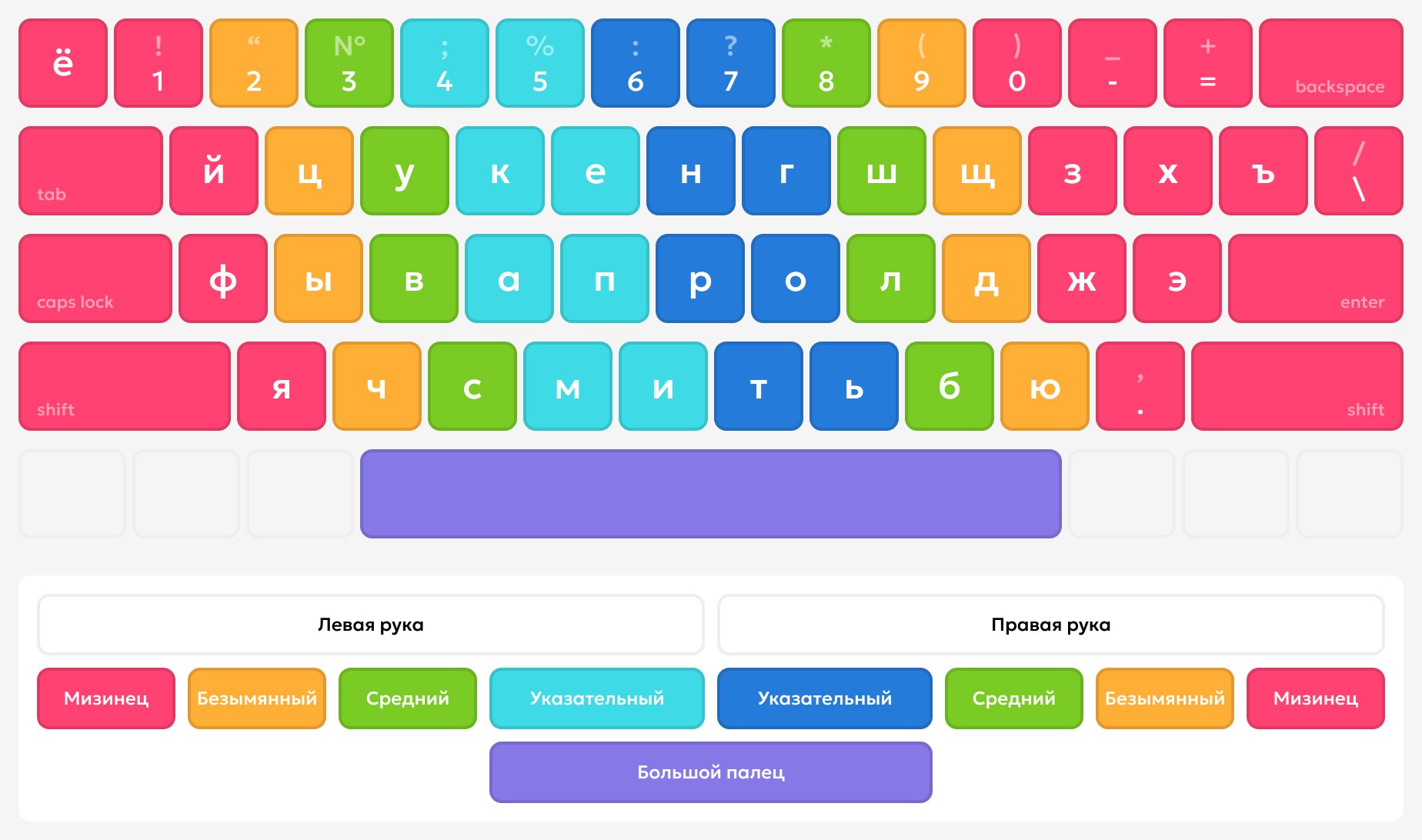 One of the most common mistakes is trying to type quickly before properly learning the layout. Don’t train bad habits. It’s much better to type slowly but accurately — the speed will come later.
 - Regular practice. Even five minutes a day matters. Muscle memory depends on consistency. The more often you practice, the faster you’ll see results.
Why Does It Matter?
Imagine already being comfortable with touch typing. You write essays and reports faster, fill out documents and spreadsheets more efficiently, reply to messages and emails effortlessly. Any computer-related task becomes easier and more enjoyable because your brain no longer wastes energy searching for keys.
In 2025, keyboards are one of our primary everyday tools. By mastering touch typing, you save both time and mental energy for things that truly matter. Start with a typing speed test: if you type slower than 40 words per minute, touch typing can realistically double your speed — while also making you more productive and less mentally drained.

